Database Migration from MS SQL Server to PostgreSQL
A Practical Guide with a Real-World Example
Von Wesner-Softwareentwicklung | Veröffentlicht am: 17.11.2025
Table of Contents
In the world of software development and database administration, transferring a project from one database management system (DBMS) to another is a common challenge. A typical scenario is migrating from a commercial Microsoft SQL Server to its powerful and free open-source equivalent, PostgreSQL. At first glance, this task may seem complex due to the different SQL dialects, but in practice, it is manageable with the right approach.
This article serves as your step-by-step guide. Using a real-world example of a small company database (Office), it demonstrates how to correctly export the schema and data from MSSQL and then adapt and import them for PostgreSQL.
This post is aimed at junior developers, database administrators, and anyone facing a similar migration task.
Tools Used:
- SQL Server Management Studio (SSMS)
- pgAdmin
- Notepad++
Step 1: Exporting Schema and Data from MS SQL Server
A common mistake is trying to create a binary backup (a .bak file). This format is MSSQL-specific and incompatible with PostgreSQL. The correct method is to export it as an SQL script, which contains the commands to restore the structure and insert the data.
Procedure in SSMS:
- In the Object Explorer, right-click on the source database (Office_Test).
- In the context menu, select "Tasks" -> "Generate Scripts...".
- Then, select the objects to be exported (all tables and views).
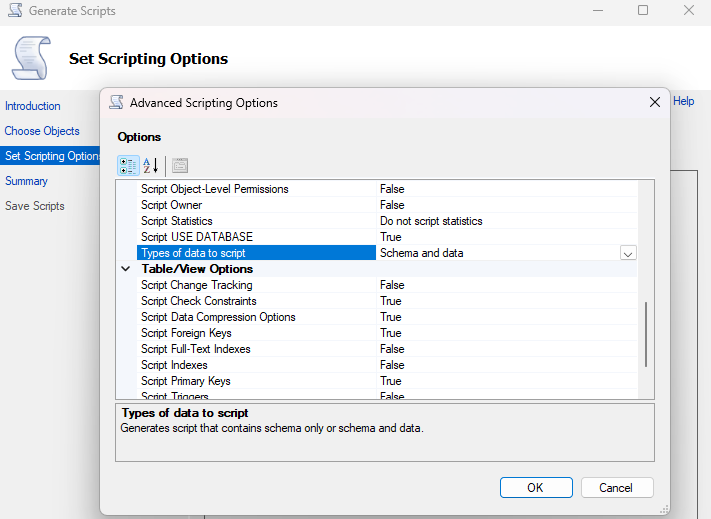
- In the "Set Scripting Options" step, choose a location for the file and click the "Advanced" button.
- In the window that opens, the option "Types of data to script" must be changed to "Schema and data". This step is crucial, as otherwise only the empty table structure will be exported.
Result: After this process is complete, you will have a single, large .sql file. This file is our starting point. It contains all the logic, but it is written in the T-SQL dialect, which PostgreSQL cannot interpret directly.
Step 2: Analyzing the Differences: The T-SQL and PostgreSQL Dialects
Before executing the script directly, the incompatible parts must be identified. Although both systems use SQL, the syntax for some key operations differs significantly.
| Aspect | MS SQL Server (T-SQL) | PostgreSQL |
|---|---|---|
| Auto-increment ID | INT IDENTITY(1,1) | SERIAL or GENERATED AS IDENTITY |
| Text Data Types | NVARCHAR, NCHAR (for Unicode) | VARCHAR, TEXT (Unicode is standard) |
| Object Names | [dbo].[TableName] | tablename (is converted to lowercase) |
| Specific Commands | USE, GO, SET IDENTITY_INSERT | Are not used |
| Key Creation | PRIMARY KEY CLUSTERED (...) ON [PRIMARY] | PRIMARY KEY (much simpler syntax) |
For a detailed comparison of the two database systems, we recommend this comprehensive article from Kinsta: https://kinsta.com/blog/postgresql-vs-sql-server/
With this knowledge, the targeted adaptation of the script can begin.
Step 3: Adapting the Script – Translating from T-SQL to PostgreSQL
The generated .sql file is opened in a text editor to perform the "translation".
3.1 Cleaning Up MSSQL-Specific Commands
First, all statements that are exclusively relevant for the configuration of the MS SQL Server are removed. This affects numerous lines at the beginning and end of the file:
- USE [DatabaseName]
- All SET ... commands (e.g., SET ANSI_NULLS ON)
- All ALTER DATABASE ... commands
- The batch separator GO
3.2 Modifying CREATE TABLE
This is the central part of the adaptation. Using the 'Positionen' table as an example:
Original in the MSSQL script:
CREATE TABLE [dbo].[Positionen](
	[PositionID] [int] IDENTITY(1,1) NOT NULL,
	[Positionsbezeichnung] [nvarchar](100) NOT NULL,
	[Gehalt] [decimal](10, 2) NOT NULL,
PRIMARY KEY CLUSTERED
(
	[PositionID] ASC
)WITH (PAD_INDEX = OFF, ...) ON [PRIMARY]
) ON [PRIMARY]
GO
Adapted for PostgreSQL:
CREATE TABLE Positionen (
    PositionID SERIAL PRIMARY KEY,
    Positionsbezeichnung VARCHAR(100) NOT NULL,
    Gehalt DECIMAL(10, 2) NOT NULL
);
The code is visibly cleaner and more concise. [dbo]. and the square brackets were removed, IDENTITY was replaced by SERIAL PRIMARY KEY, and nvarchar was replaced by VARCHAR.
3.3 Simplifying INSERT and VIEWS
The INSERT commands must be cleaned of SET IDENTITY_INSERT and the prefix N before strings. Fortunately, the code for CREATE VIEW requires hardly any changes, as the JOIN syntax is part of the SQL standard.
Final Result: The Universal "Master Script" for PostgreSQL
After all adaptations, a single, clean script is available, ready for execution in pgAdmin. It creates the entire database structure from scratch, populates it with data, and restores the views.
Important Recommendations for Professional Practice (Bonus Section)
Simply adapting the script is only half the battle. It should be extended with a few aspects to make it robust and professional.
Recommendation 1: Synchronizing the Auto-Increment Counters
Problem: By manually inserting data with specific IDs (INSERT ... (PositionID, ...) VALUES (1, ...)), the internal counter of the SERIAL type in PostgreSQL is no longer synchronized. Trying to add a new record would lead to a "duplicate key" error.
Solution: After all INSERT commands, special functions must be executed to inform PostgreSQL of the current maximum value for each counter.
-- Synchronization of counters for SERIAL fields
SELECT setval('positionen_positionid_seq', (SELECT MAX(positionid) FROM positionen));
-- ... etc. for all tables with SERIAL columns
This is a mandatory step for the correct operation of the database after a manual data import.
Recommendation 2: Pay Attention to Case Sensitivity!
Problem: MSSQL retained the "CamelCase" notation (PositionID), while PostgreSQL, by default, converted all names to lowercase (positionid).
Recommendation: It is advisable to accept this PostgreSQL standard (lowercase and, if necessary, snake_case, e.g., position_id). This significantly simplifies future queries and avoids confusion.
Conclusion
As it turns out, migrating from MS SQL Server to PostgreSQL is more than just "copy and paste" – it's a thoughtful process of syntactic adaptation. By understanding the key differences in the SQL dialects and applying the best practices of the target system, the transition can be made smooth and reliable.